
Facebook Pixel for Magento 2
Track Conversions ~ Optimize Ads ~ Improve Performance

The Hikmadh Facebook Pixel for Magento 2 is a powerful tracking and integration extension that helps you monitor customer behavior and measure conversions from your Facebook and Meta Ads.
It connects your Magento store with Facebook Pixel and Conversion API, allowing you to track important events like product views, add-to-cart actions, and completed purchases—without any coding.
✔ Easy Facebook Pixel integration
✔ Track key eCommerce events
✔ Improve ad performance with data
✔ Support for Conversion API
✔ GDPR-compliant tracking
The Hikmadh Facebook Pixel extension enables accurate tracking of user interactions across your store. It helps you collect valuable marketing data, optimize your campaigns, and improve conversion rates with better audience targeting.
Key Features
Easy Pixel Integration: Add your Facebook Pixel ID from the admin panel and start tracking instantly.
Automatic Event Tracking: Track key events like product views, add to cart, checkout, and purchases automatically.
Conversion API Support: Enable server-side tracking for more reliable and accurate data collection.
Advanced Matching: Improve tracking accuracy by sending enhanced customer data to Facebook.
Event Deduplication: Avoid duplicate event tracking between browser and server-side data.
Multi-Store Support: Use different Pixel IDs for multiple store views and localized campaigns.
GDPR Compliance Ready: Control data tracking based on user consent and privacy regulations.
Optimized Script Loading: Load Facebook Pixel only after user interaction to maintain site performance.
Installation
System Requirements
Before installing the Hikmadh Facebook Pixel extension, ensure:
Magento 2.3.x – 2.4.x
PHP 7.4 or higher
Facebook Pixel ID
Upload Extension Files
Extract the extension package
Upload files to:
app/code/Hikmadh/FacebookPixel
Ensure folder structure remains intact
Enable the Module
Run the following Magento CLI commands:
php bin/magento setup:upgrade
php bin/magento setup:di:compile
php bin/magento setup:static-content:deploy -f
php bin/magento cache:flush
Verify Installation
After installation:
Go to:
Stores → Configuration → Hikmadh → Facebook Pixel
Ensure the settings are available.
Configuration
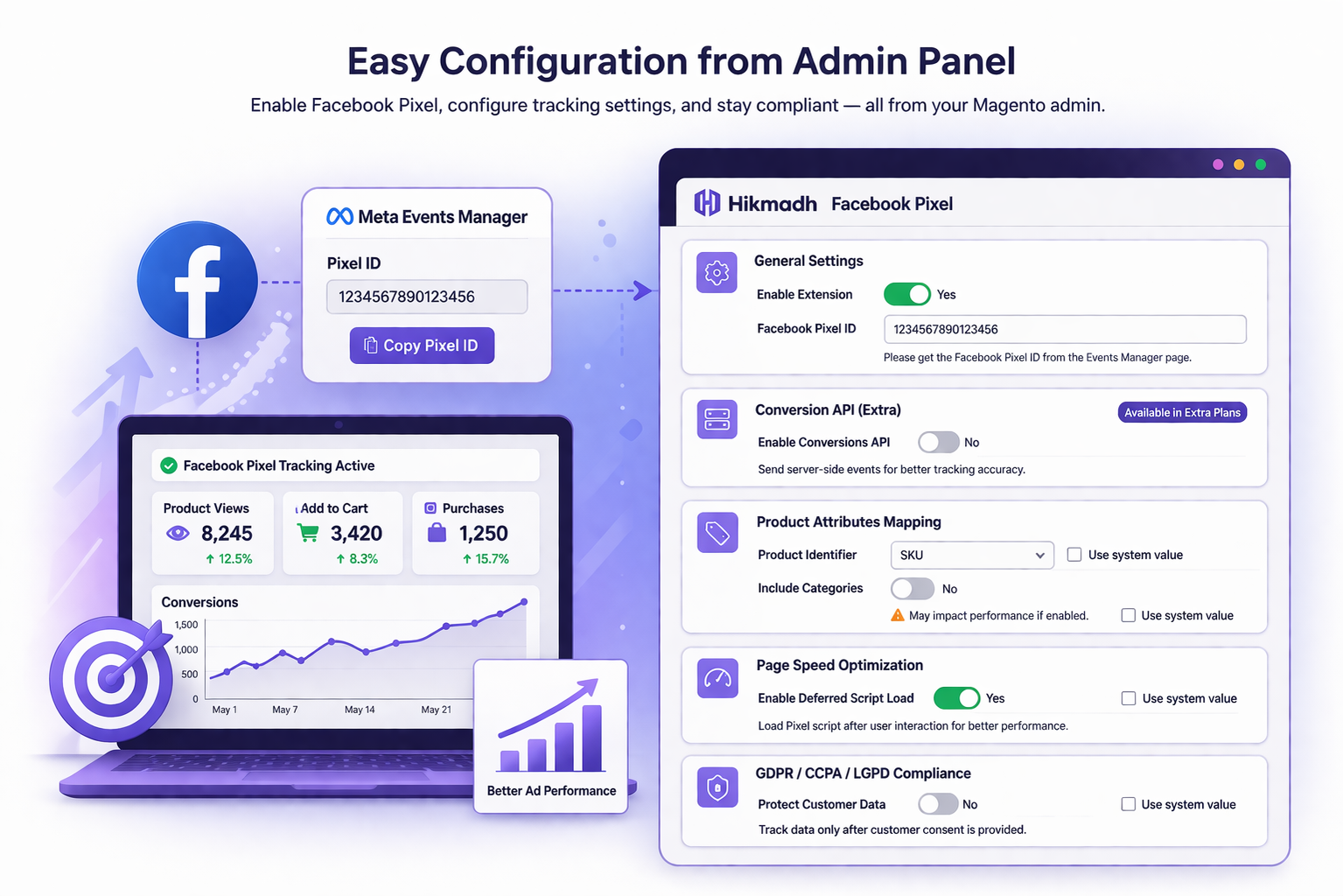
General Settings
Enable Extension
Enable or disable the Facebook Pixel module.
Facebook Pixel ID
Enter your Pixel ID from Meta Events Manager.
Conversion API Settings
Enable Conversion API
Activate server-side tracking for improved data accuracy.
Tracking Settings
Product Attribute Mapping
Map product identifiers like SKU for accurate tracking.
Include Categories
Choose whether to include category data in events.
Performance Settings
Deferred Script Loading
Load pixel script only after user interaction for better performance.
Privacy Settings
Customer Data Protection
Enable GDPR/CCPA compliance by tracking data only after user consent.
Why Use Facebook Pixel?
Running ads without proper tracking makes it difficult to measure performance and improve results. With Hikmadh Facebook Pixel, you can track customer actions, build remarketing audiences, and optimize campaigns based on real data.
Benefits
Optimize Facebook Ads
Use customer behavior data to improve targeting and campaign performance.
Improve Conversion Rates
Analyze user actions and refine your ads to drive more sales.
Track Checkout Behavior
Monitor checkout steps and reduce cart abandonment.
Monitor Product Performance
Understand which products attract attention and convert better.
Better Audience Targeting
Create personalized and retargeting campaigns with accurate data.