
How to Download and Install Hyvä Open Source?
The Hyvä Theme, which was previously priced at €1000, is now officially available as an open-source solution.
Starting from November 10, 2025, developers can access the Hyvä Theme for free via GitHub and install it using complimentary Packagist Composer keys provided directly by Hyvä.
In this guide, we’ll walk you through how to download and install the Hyvä Open Source theme, allowing you to take advantage of its speed, lightweight architecture, and high-performance benefits—without any licensing cost.
Let’s get started.
Steps to Download and Install Hyvä Open Source
Follow the steps below to successfully install the free Hyvä Theme on your Magento store.
Step 1: Create a Hyvä Account
Visit the official Hyvä website and begin the account registration process. Once completed, you will be automatically redirected to the Hyvä Portal.
After logging in to the Hyvä Portal, you will receive a confirmation email containing your Hyvä Theme access credentials along with detailed installation instructions.
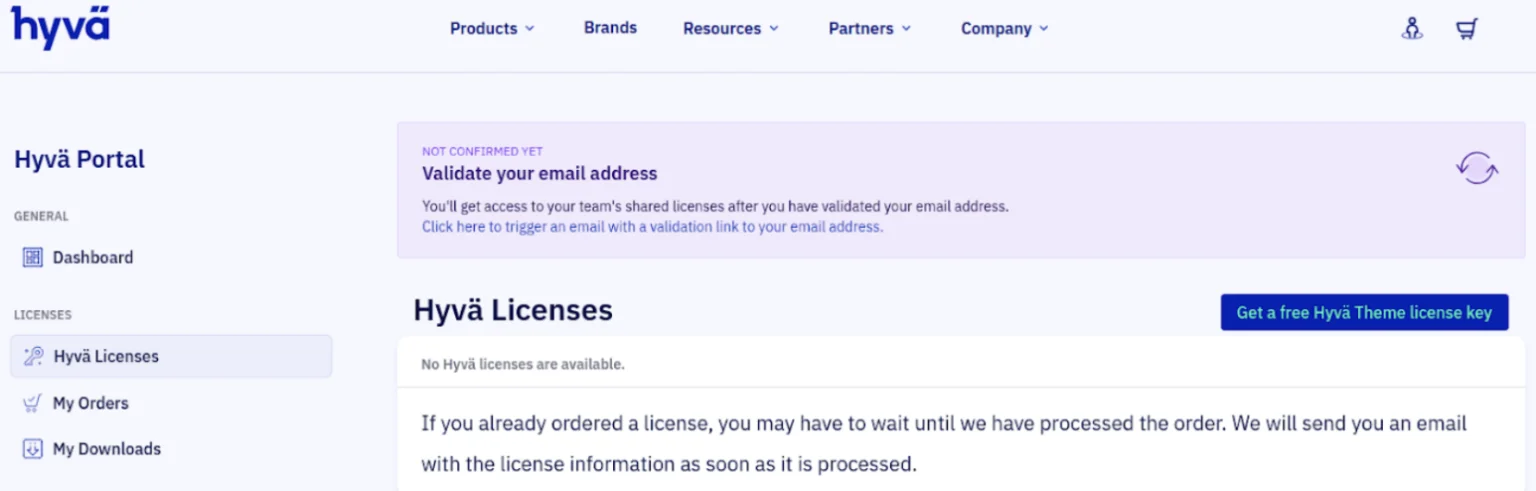
Step 2: Obtain the Free License Key
You can also generate the required access keys directly from the Hyvä Portal by following the steps below.
- Navigate to Hyvä Licenses and click on “Get a Free Hyvä Theme License Key”.
- You will be prompted to enter your domain name.
- After entering the domain, click on “Get Hyvä Theme for Free”.
- Once the process is complete, all the necessary keys required for installation will be generated and made available.
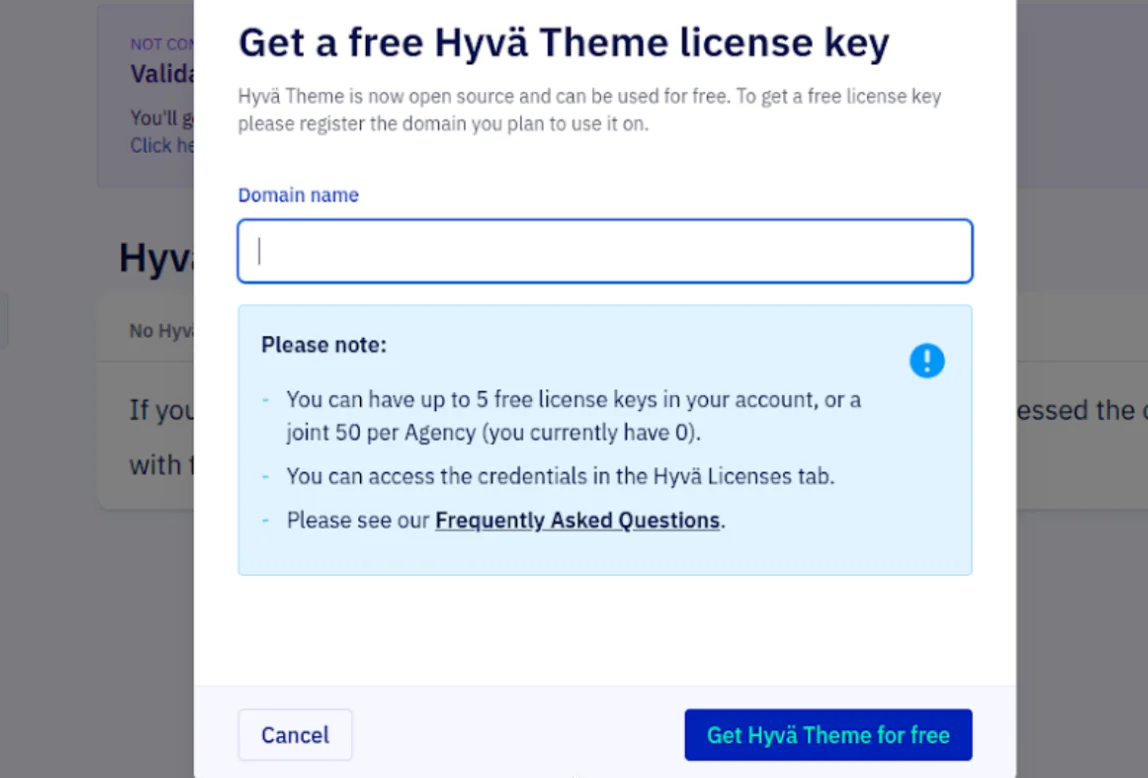
Step 3: Retrieve Composer Credentials
In the All Licenses section of the Hyvä Portal, locate the license entry associated with your registered domain.
Click on “Show Composer Credentials” to display your unique access information.
This section provides your private Packagist authentication key along with the required Composer commands needed to configure your environment for the Hyvä Open Source installation.
Command format will appear similar to the example below:
					composer config --auth http-basic.hyva-themes.repo.packagist.com token {{Your token}}
composer config repositories.private-packagist composer https://hyva-themes.repo.packagist.com/{{ your repo name here}}/
Step 4: Install the Hyvä Default Theme
Once your Composer credentials have been configured successfully, you can proceed with installing the core Hyvä Theme package.
Run the following Composer command to download and install the default Hyvä Theme:
composer require hyva-themes/magento2-default-theme
The Hyvä Theme uses its own optimized front-end build pipeline for handling assets efficiently. For best performance and compatibility, it is strongly recommended to disable Magento’s default JavaScript and CSS minification and bundling features, as they can introduce unnecessary overhead or unexpected behavior when used with Hyvä.
Execute the following configuration commands:
					php bin/magento config:set customer/captcha/enable 0
php bin/magento config:set dev/template/minify_html 0
php bin/magento config:set dev/js/merge_files 0
php bin/magento config:set dev/js/enable_js_bundling 0
php bin/magento config:set dev/js/minify_files 0
php bin/magento config:set dev/js/move_script_to_bottom 0
php bin/magento config:set dev/css/merge_css_files 0
php bin/magento config:set dev/css/minify_files 0
Step 5: Install Essential Hyvä Modules
To ensure full functionality of the Hyvä Theme, you must install a set of essential modules. These modules provide critical features such as Luma-based checkout compatibility and the Tailwind CSS Just-In-Time (JIT) compiler required for Hyvä’s front-end workflow.
Install the following required modules to complete the setup:
					composer require hyva-themes/magento2-luma-checkout
composer require hyva-themes/magento2-cms-tailwind-jit
Step 6: Run Final Magento Commands and Verify the Installation
After all required packages and modules have been installed successfully, run the standard Magento CLI commands to complete the setup and apply the changes.
Execute the following commands to finalize the installation and verify that everything is working as expected:
					php bin/magento se:up
php bin/magento s:s:d -f
php bin/magento s:d:c
php bin/magento c:c
php bin/magento c:f
					hyva-themes/
├── magento2-base-layout-reset/
├── magento2-cms-tailwind-jit/
├── magento2-compat-module-fallback/

magento2-default-theme/
├── .gitlab/
├── etc/
├── Hyva_Theme/
├── i18n/
├── Magento_AdvancedSearch/
├── Magento_Bundle/
This concludes our step-by-step guide on how to successfully download and install the Hyvä Open Source theme.
If you’re unsure about handling these steps on your own, our experienced Hyvä experts are here to assist you throughout the process.
Our experts can help you with:
- Building a custom Hyvä theme from scratch
- Customizing the theme to match your design and business requirements
- Creating a child theme for specific Magento 2 projects
Get in touch with us today and make the most of the powerful and high-performance Hyvä theme for your Magento 2 store.